ScanToSchool.com
  • HOME
  • YOUR SCHOOL
  • FEATURES
  • SIGN UP
  • SUPPORT
  • LOGIN

Support

Find help here!

Program Administration

  • Add Teacher
  • Add/Edit Student
  • Request new teacher on next scan
  • Reset Monkey Money to $0
  • Back Date Trips?
  • Paper Parent Consent Forms
  • Quick Start Settings
  • Where did my Online Registration form go?
  • Why do I get these messages?
  • The message From/To pair violates a blacklist rule
  • Locating the scanned barcodes on the Motorolla CS3000 and CS3070
  • Set Date and Time on Motorolla CS3000 and CS3070
  • Import barcodes from text file
  • Reset your password
  • Show me the prizes!

Must Read

  • Can I scan with my smart phone?
  • Program Setup
  • Add Mobile App User
  • Online Registration
  • Send two Text/Emails for one account
  • Text Cost
  • Delete Students
  • Renewal Startup Check List
  • Diagnosing problems with the mobile app
  • Flyers and Fact Sheets
  • Do I really need a USB scanner?
  • Virtual Badges
  • Do I have to reregister all the students next year?
  • Monkey Money
  • Export Data

Reset Monkey Money to $0

This sets the selected students Monkey Money Total to $0.
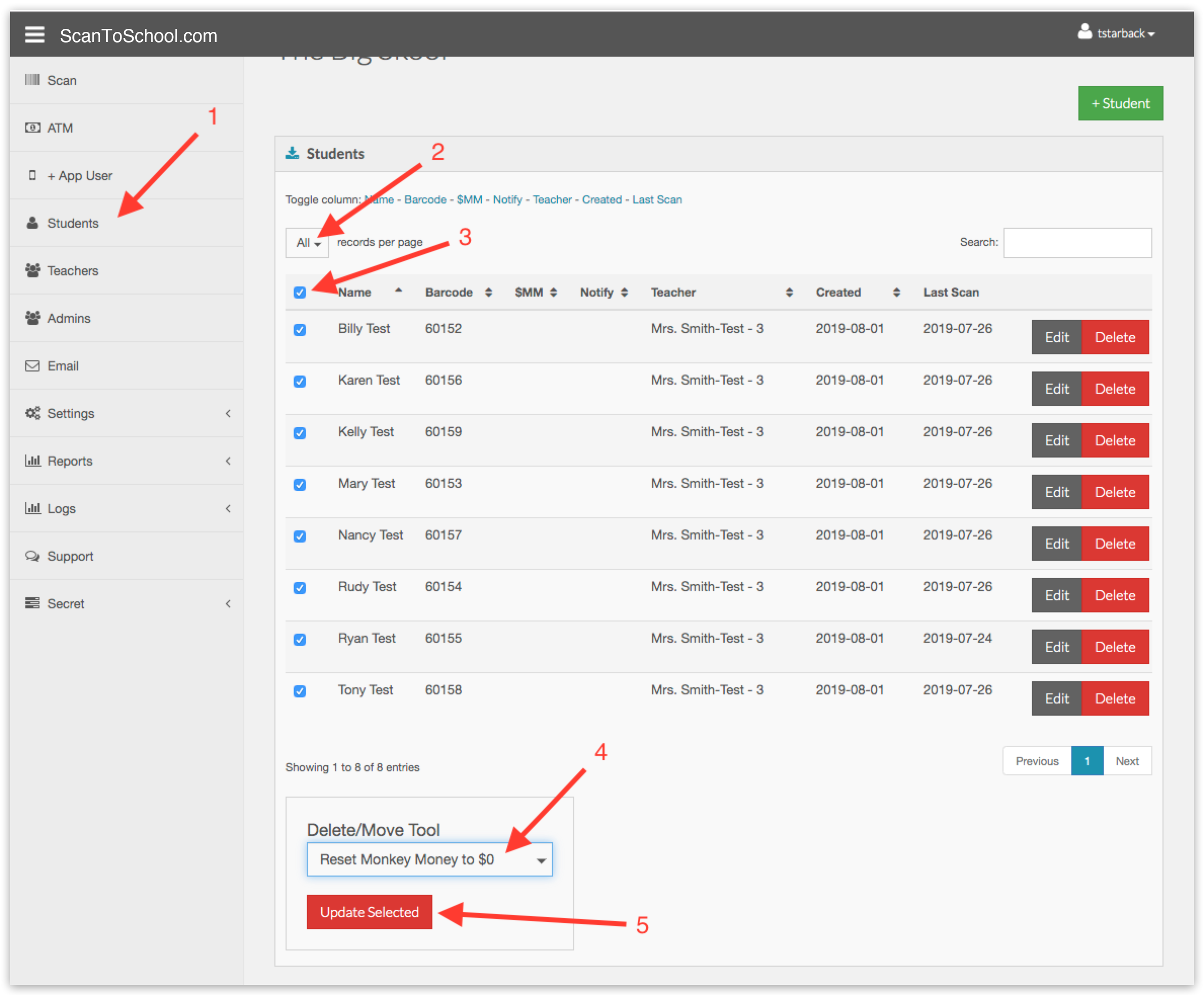
1. Click "Students" in the side bar menu.

2. Change "Records per page" to "All"

3. Click the check all checkbox at the top of the table

4. Select "Reset Monkey Money to $0" from the "Delete/Move Tool"

5. Click the red "Update Selected" button.

ScanToSchool.com
1918 Del Paso Road, Suite 100
Sacramento CA 95834

Phone: (916) 419-9955
Email : info@scantoschool.com

  • Privacy
  • Terms

© 2026 ScanToSchool.com All Rights Reserved.